
You are here:
LookyTAB 10
More than magnification: Independence within reach
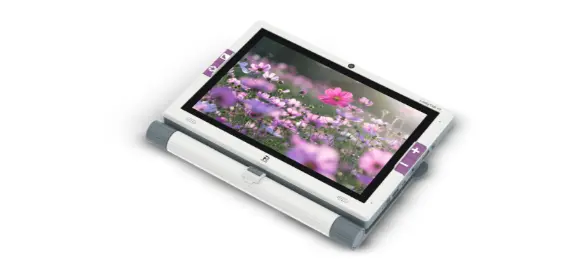
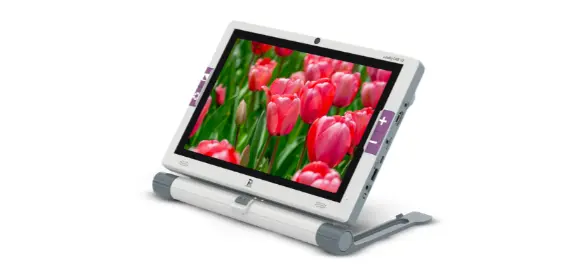
The LookyTAB 10 is the very latest mobile video magnifier. It is an ideal solution between small, portable handheld magnifiers and large desktop video magnifiers. The large 10.1-inch Full HD touchscreen, combined with the built-in cameras, makes it easy to view and read documents, photos, and text sharply and comfortably, so every detail is clearly visible.
The device is specially designed for everyday use. The LookyTAB 10 helps people with visual impairments experience greater independence, confidence, and ease of use. Great for at home, and great when on the go.
What is the LookyTAB 10?
The LookyTAB 10 is an all-in-one mobile video magnifier that enlarges and optimizes printed and digital materials on a large, crystal-clear screen with high image quality, such as newspapers, magazines, letters, and other documents.
With a 13 MP rear camera for reading and viewing, and a 5 MP front camera for video calls and selfies, it offers powerful and versatile support for communication and daily activities.
The LookyTAB 10 is available in two different versions: a basic model and an OCR model. It is possible to save and edit images or have text read aloud using the optional OCR function (text-to-speech).
Thanks to its intuitive controls, practical built-in apps (calculator, notes, mirror, calendar, etc.), and both touch and physical controls, the LookyTAB 10 is suitable for all ages.
Innovation that enables independence
The LookyTAB 10 offers more than just magnification: It is a tool for maximum independence.
With the built-in slider, the screen can easily be moved from left to right, allowing smooth reading. In addition, you can easily connect the device to a larger screen for better overview and even more comfort.
Specifications
- 10.1” Full HD-display
- 13 MP rear camera / 5 MP front camera
- Magnification up to 25x
- Touchscreen with physical buttons
- Optional OCR and text-to-speech functionality
- Horizontal slide-and-read ability
- Built-in apps: Calculator, Notes, Mirror, Calendar
- Battery life: 3+ hours
- Charge via DC charger
Accessories for the LookyTAB 10
Get the most out of your LookyTAB 10 with the right accessories.
The LookyTAB 10 is more than just a magnifier—with smart accessories, it becomes a complete workstation for people with visual impairments.
Designed for comfort, productivity, and independence. With these extensions, you can work even more comfortably and have more possibilities within reach.
Large Print Keyboard

The Large Print Keyboard is the ideal addition to the LookyTAB 10.
With large, high-contrast letters and wireless connectivity, you can type effortlessly, navigate menus, and take notes.
It connects easily via Bluetooth 5.0 or a 2.4G USB dongle. Available in a US layout (QWERTY) and a German layout (QWERTZ) for comfort and clarity for every user.
OCR Arm (Separate Add-on)
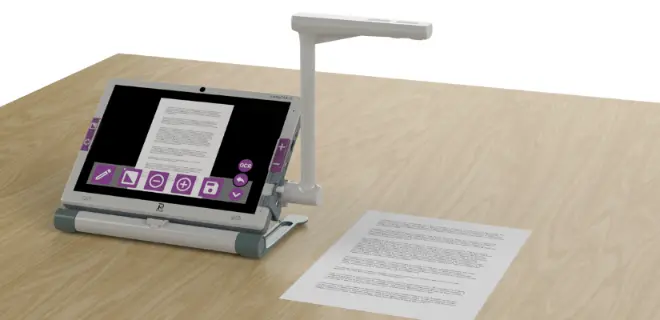
Take your LookyTAB 10 to the next level with the OCR Arm. The OCR Arm is a sturdy, adjustable stand that holds your device at the perfect reading angle.
Combined with the OCR function (Optical Character Recognition), you can scan printed text and have it read aloud instantly. Ideal for longer texts, completely hands-free and without effort.
The OCR Arm ensures stable positioning, a sharp image, and a comfortable viewing height. This transforms your LookyTAB 10 into a powerful desktop magnifier and reading device in one.
Frequently asked questions
You hold an electronic handheld magnifier, in the same way as an ordinary magnifying glass, on or just above the text or image that you wish to magnify. The text/image is displayed on the screen. When you hold the electronic handheld magnifier on or at a maximum of five centimetres above the surface you will always see a sharp image with text that is very easy to read. You can view the text in full colour or increase the contrast with one of the special high-contrast modes that are specifically designed to make the text as easy to read as possible.
With the Looky Mag, you can easily place a signature or write a short note. Simply hold the handle while writing.
Our handheld magnifiers are compact and lightweight. They are available starting from just 150 grams.
Looky handheld magnifiers are ideal for use indoors or at work – and are really useful when you are out.
Your healthcare insurer reimburses the full cost of our electronic handheld magnifiers. The handheld magnifier must be prescribed by a specialist recognized by the healthcare insurer to qualify for reimbursement, such as the ophthalmologist or other physician who is treating you or a regional institution such as Royal Dutch Visio or Bartiméus. Information about the reimbursement of the costs of our Lookys is available under the ‘your healthcare insurer’ heading on our website.
Your GP will usually refer you to an ophthalmologist or other specialist. The Netherlands has a number of regional institutions that have a great deal of knowledge about all optical aids, including handheld magnifiers. You can contact us for an address in your neighbourhood.
- How does an electronic handheld magnifier work?
-
You hold an electronic handheld magnifier, in the same way as an ordinary magnifying glass, on or just above the text or image that you wish to magnify. The text/image is displayed on the screen. When you hold the electronic handheld magnifier on or at a maximum of five centimetres above the surface you will always see a sharp image with text that is very easy to read. You can view the text in full colour or increase the contrast with one of the special high-contrast modes that are specifically designed to make the text as easy to read as possible.
- Can I use an electronic handheld magnifier to help me when I am writing a note?
-
With the Looky Mag, you can easily place a signature or write a short note. Simply hold the handle while writing.
- How much does an electronic handheld magnifier weigh?
-
Our handheld magnifiers are compact and lightweight. They are available starting from just 150 grams.
- Where can I use Looky handheld magnifiers?
-
Looky handheld magnifiers are ideal for use indoors or at work – and are really useful when you are out.
- Are the costs of an electronic handheld magnifier reimbursed?
-
Your healthcare insurer reimburses the full cost of our electronic handheld magnifiers. The handheld magnifier must be prescribed by a specialist recognized by the healthcare insurer to qualify for reimbursement, such as the ophthalmologist or other physician who is treating you or a regional institution such as Royal Dutch Visio or Bartiméus. Information about the reimbursement of the costs of our Lookys is available under the ‘your healthcare insurer’ heading on our website.
- How can I contact a specialist who can prescribe this for me?
-
Your GP will usually refer you to an ophthalmologist or other specialist. The Netherlands has a number of regional institutions that have a great deal of knowledge about all optical aids, including handheld magnifiers. You can contact us for an address in your neighbourhood.